
Tax Document Automation: The Complete Guide to Inbound and Outbound in SAP
Every company that generates revenue in Brazil issues or receives an electronic tax document every day: NF-e, CT-e, NFS-e, MDF-e, NFCom. Each has its own layout, is issued by a different state tax agency (SEFAZ) or city government, and has a short window for correcting errors.
When this process relies on manual data entry, the problem isn’t just speed—it’s risk. An invoice posted with the wrong CFOP code results in a credit rejection. An NFS-e lost among more than 5,000 city governments, each with its own rules, results in a fine. An XML file that doesn’t arrive from SEFAZ halts the physical receipt of the goods.
Tax document automation addresses both sides of this equation: the receipt of supplier invoices (inbound) and the management and distribution of documents (outbound). In this guide, you’ll learn how each module works, why separating them conceptually helps you prioritize your investment, and how InvoiceCon covers both ends of the process within SAP.
What is tax document automation?
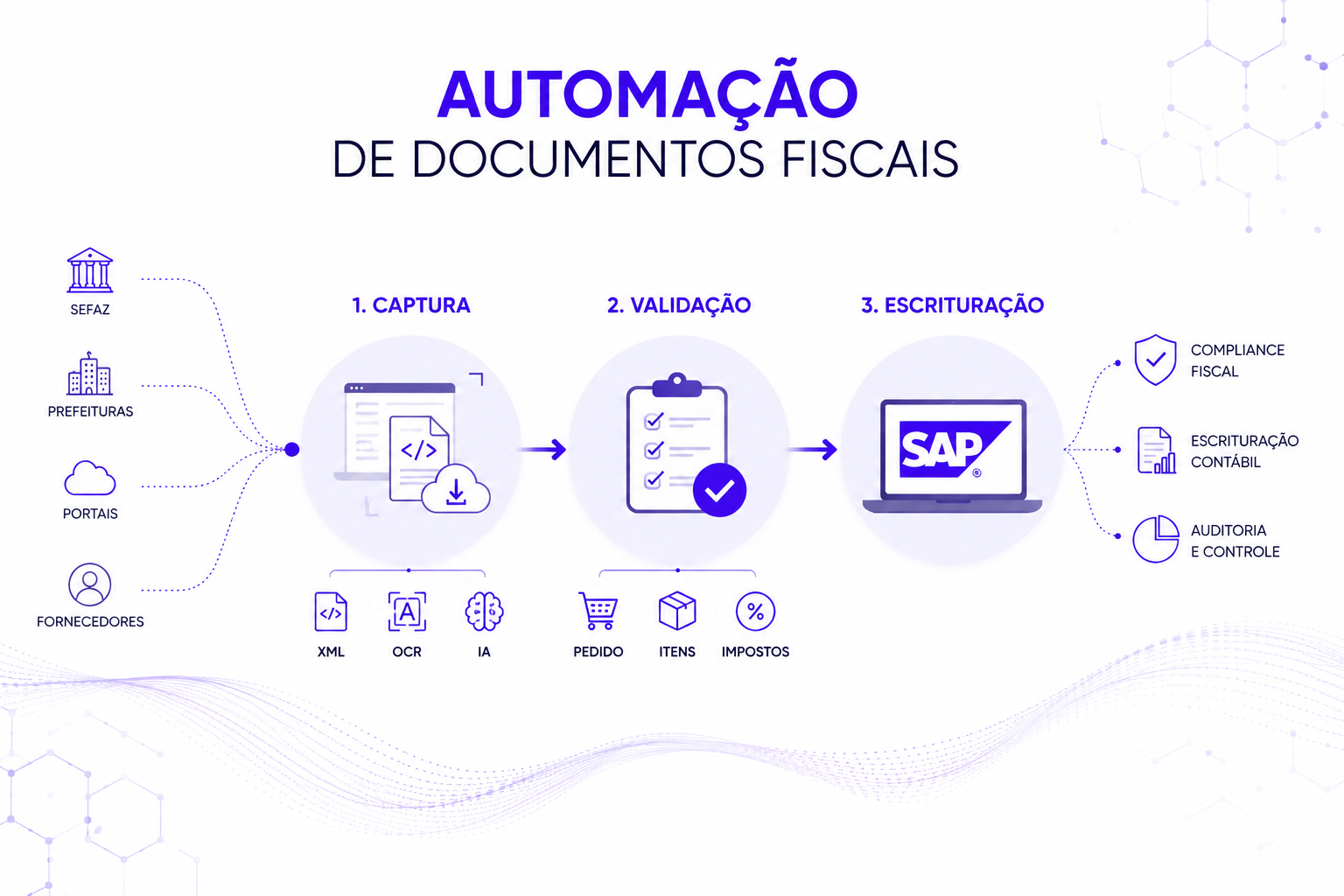
Tax document automation is the use of technology (automatic capture, OCR (Optical Character Recognition), artificial intelligence, and ERP integration) to eliminate manual data entry when receiving and issuing NF-e, CT-e, NFS-e, MDF-e, and NFCom.
In practice, this means three things:
1 Capture without human intervention: Documents are received via SEFAZ, city hall, or the portal, without the need for manual downloading.
2 Automatic validation against the ERP: The system cross-checks the item, quantity, tax, and purchase order before any posting.
3 Direct Posting in SAP: The invoice enters the system already reconciled, ready for payment or for submission to the tax authority.
According to the 2026 Tax Invoice Maturity Overview, more than half of all tax transactions in Brazil still only validate the CNPJ and the total invoice amount, without cross-checking line items and taxes against the purchase order. The result is a process that appears to be automated but only handles data capture and shifts the risk downstream.
Inbound and Outbound: The Two Ends of the Same Process
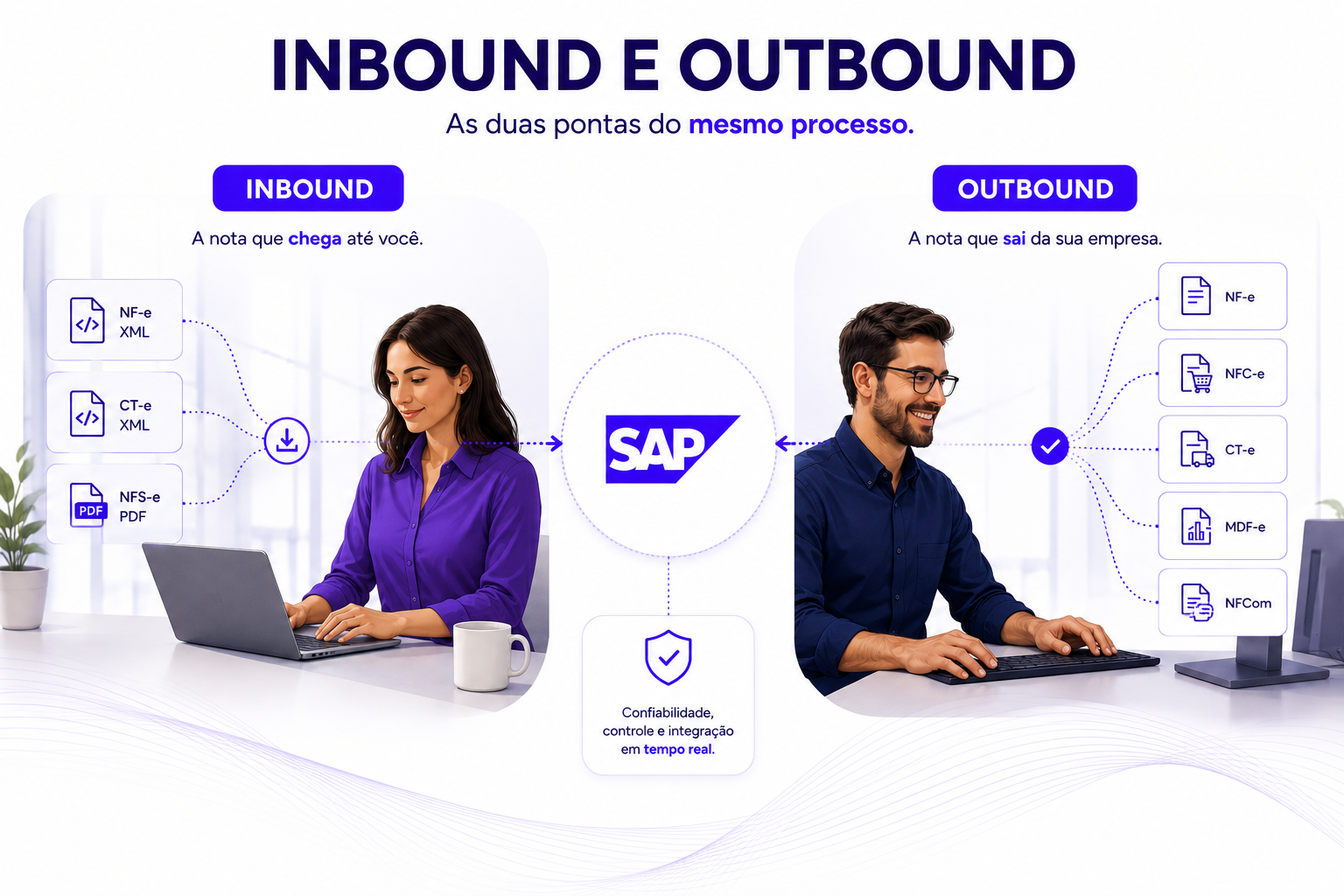
Talking about tax automation as if it were a single entity obscures a real problem: incoming and outgoing invoices have different bottlenecks, different teams, and different priorities within the company. That’s why InvoiceCon is divided into two modules.
Inbound: The Note That Reaches You
InvoiceCon Inbound handles the receipt of NF-e, CT-e, and NFS-e documents issued by suppliers and service providers. It retrieves NF-e and CT-e XML files directly from SEFAZ, without the need for manual downloads, and uses AI and OCR to read NFS-e PDFs, adapting to the different layouts used by each municipality.
From there, the invoice is automatically linked to the purchase order, goes through goods receipt processing, and becomes available in a single tax monitoring system within SAP, complete with advanced filters and detailed reports. All of this is already compatible with S/4HANA and integrated with SOFICOM, which adds ICMS credit control for fixed assets (CIAP) and third-party materials management (3P2M) to the same workflow.
Outbound: Invoices Issued by Your Company
InvoiceCon Outbound automates the signing, issuance, submission, and management of NF-e, NFC-e, CT-e, NFS-e, MDF-e, and NFCom directly from SAP. It digitally signs and sends these documents to SEFAZ, monitors the status of each document in real time, generates and sends DANFE, DACTE, and DAMDF-e via email, and simplifies the processes for cancellation, voiding, and correction letters.
For NFS-e, the challenge is different: each of the country’s thousands of municipalities may have its own rules and systems. InvoiceCon Outbound adapts to these variations, whether through established solution providers or through the proprietary systems of large municipalities. For MDF-e, the difference lies in covering the entire cycle (manifest creation, event triggering, and monitoring by the municipality where the document is downloaded) rather than just the messaging aspect, as is the case with solutions that only handle the transmission of the finished document.
Why this matters now: The tax reform has changed the weight of the invoice
Until recently, the invoice served primarily as a record. With the Consumption Tax Reform, it has become the main tool for automatic tax calculation. As of January 2026, the NF-e and NFC-e must include the IBS and CBS fields, and the National NFS-e has become mandatory for all Brazilian municipalities.
The transition period will last until 2033, with the old systems (ICMS, ISS, PIS, Cofins) coexisting with the new taxes. This means that, in practice, every company will operate under two tax regimes in parallel for years. Manual systems or those with internal customizations in SAP tend to break with every new technical note, because each layout update is a potential point of failure for those who rely on routines that copy data between systems.
Automating data entry and invoicing is no longer just a matter of efficiency—it has become essential to keeping revenue flowing.
How InvoiceCon Covers Both Ends Within SAP
What sets InvoiceCon apart is that it does more than just automate each module individually; it keeps both within the same SAP ecosystem, without parallel customizations that break with every update:
- Secure digital storage: with all documents organized and ready for an audit.
- Compatibility with S/4HANA: Leveraging the capabilities of the new generation of SAP without duplicating maintenance efforts.
- Integration with SOFICOM: combining data entry automation with tax credit control and third-party materials management in a single suite.
- Automatic contingency management: in Outbound, without requiring manual user action when SEFAZ is unavailable.
- Single dashboard: to track, on a single screen, all tax documents entering and leaving the company.
Frequently Asked Questions
What is the difference between InvoiceCon Inbound and Outbound?
Inbound automates the entry of invoices from suppliers and service providers (NF-e, CT-e, NFS-e). Outbound handles management and messaging, automating the issuance of the company’s own documents (NF-e, NFC-e, CT-e, NFS-e, MDF-e, and NFCom). Both modules run within SAP and can be implemented together or separately, depending on operational priorities.
Is InvoiceCon already prepared for the tax reform?
Yes. InvoiceCon keeps up with the layout updates required by the Consumer Tax Reform, including the new IBS and CBS fields in the NF-e and NFC-e, and the adoption of the National NFS-e by municipalities.
Does InvoiceCon work with S/4HANA and ECC?
Yes. The solution is compatible with S/4HANA and also runs in SAP ECC environments, without requiring parallel customizations that would increase maintenance costs over time.
Do I need to implement Inbound and Outbound at the same time?
No. Each module addresses a specific pain point and can be prioritized independently, depending on where the company’s tax operations are currently feeling the greatest impact.
If your accounting team still relies on manual data entry—whether for entering supplier invoices or issuing your own documents—it’s worth understanding where automation will deliver the fastest return on investment for your business.
Talk to CAST and find out how InvoiceCon fits into your SAP operation.